ROSI Collector
ROSI Collector is the current container-based ROSI deployment profile, combining rsyslog, Loki, Grafana, Prometheus, and Traefik for centralized logging and monitoring.
Rsyslog Operations Stack Initiative (ROSI) Collector is a production-ready centralized log collection and monitoring stack. It combines rsyslog’s powerful log processing with modern observability tools to provide a complete logging solution.
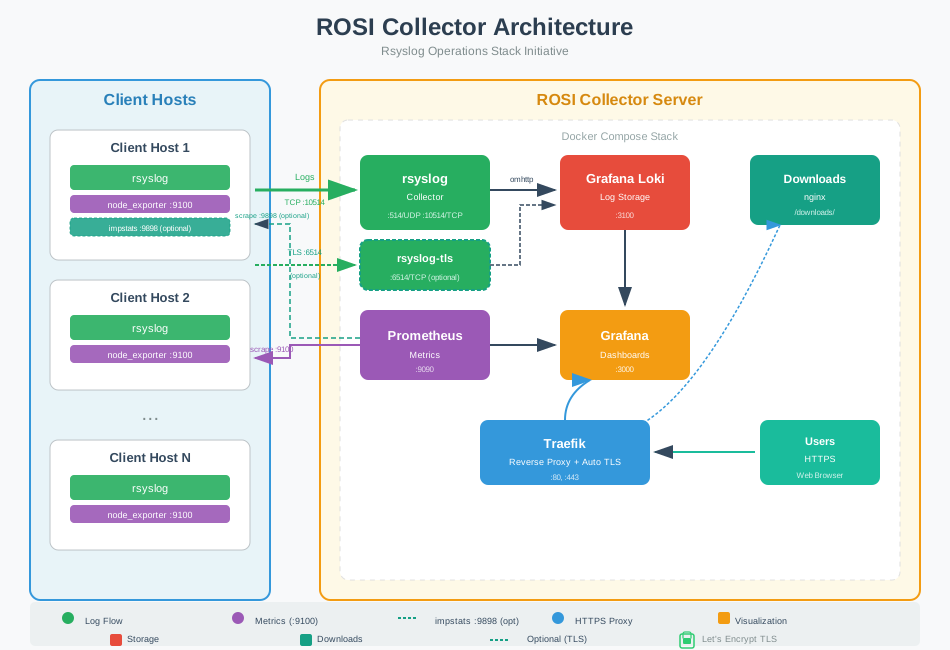
ROSI Collector architecture - centralized logging with rsyslog, Loki, and Grafana
What is ROSI Collector?
ROSI Collector is a Docker Compose stack that deploys:
rsyslog - High-performance log receiver and processor
Grafana Loki - Log aggregation and querying
Grafana - Visualization with pre-built dashboards
Prometheus - Metrics collection and alerting
Traefik - Reverse proxy with automatic TLS
Together, these components provide centralized log management for any number of client hosts, with powerful search, visualization, and alerting capabilities.
ROSI Collector is the current container-based ROSI deployment profile described in this guide. The broader ROSI stack also supports Windows clients via official components such as rsyslog Windows Agent. Other components such as WinSyslog, EventReporter, and MonitorWare Agent can also be integrated to meet specific operational requirements. ROSI Collector is the primary packaged artifact today, while the broader ROSI idea extends beyond this single deployment profile. That broader model has long been possible through rsyslog-based integrations and parallel destinations; ROSI adds clearer guidance and progressively more turnkey artifacts around those practices.
Note
The installation scripts have been tested on Ubuntu 24.04 LTS. Other Debian-based distributions should work with minor adjustments.
Use Cases
ROSI Collector is ideal for:
Centralized log aggregation from multiple servers and applications
Security monitoring with searchable audit logs
Compliance requirements needing log retention and search
DevOps teams wanting quick visibility into system logs
Small to medium deployments with up to hundreds of hosts
Key Features
- Pre-built Dashboards
Five Grafana dashboards: Syslog Explorer, Syslog Analysis, Syslog Health (impstats), Host Metrics Overview, and Alerting Overview.
- Automatic TLS
Traefik obtains Let’s Encrypt certificates automatically. No manual certificate management required.
- Syslog TLS Support
Optional TLS-encrypted syslog on port 6514 with three authentication modes: server-only (anon), mutual TLS (x509/certvalid), and name-based mutual TLS (x509/name).
- Easy Client Setup
Automated installation scripts for rsyslog forwarding and node_exporter. Scripts are served via the built-in downloads container.
- CLI Management Tools
rosi-monitorfor health monitoring (including Docker internal IPs and network info) andprometheus-targetfor managing Prometheus scrape targets (add/remove by IP or hostname).- Prometheus Metrics
Collect system metrics from all clients via node_exporter.
- Alerting Ready
Email alerting configured and ready to enable.
Quick Start
If you want a guided end-to-end walkthrough before diving into the full deployment reference, start with Tutorial: Deploy a Private, Centralized Observability Stack with ROSI Collector.
Clone the repository and navigate to the deployment:
cd rsyslog/deploy/docker-compose/rosi-collector
Initialize environment using the provided script:
sudo TRAEFIK_DOMAIN=logs.example.com \
     TRAEFIK_EMAIL=admin@example.com \
     ./scripts/init.sh
The script will:
Prompt for installation directory (default:
/opt/rosi-collector)Generate
.envwith secure passwordsCopy config files, create Docker network, and systemd service
Install node_exporter on the server and add to Prometheus
Optionally configure server syslog forwarding and impstats sidecar
Configure firewall rules for Docker container access
Start the stack:
cd /opt/rosi-collector
docker compose up -d
Access Grafana at
https://your-domain.comConfigure clients - see Client Setup
For detailed installation instructions, see Installation.
Architecture Overview
Client Hosts                    ROSI Collector Server
┌────────────┐                 ┌─────────────────────────────────┐
│  rsyslog   │──TCP:10514────▶ │  rsyslog  ──────────────▶  Loki │
│            │                 │                                 │
│node_exporter│◀─────────────── │  Prometheus                     │
└────────────┘   scrape:9100   │       │                         │
                               │       ▼                         │
                               │    Grafana  ◀── Traefik (TLS)   │
                               └─────────────────────────────────┘
Data flows:
Logs: Client rsyslog → Collector rsyslog → Loki → Grafana
Metrics: Prometheus scrapes node_exporter on clients → Grafana
For Windows senders, use
rsyslog Windows Agent as an
official ROSI Windows-side component. The collector-side flow stays the same
once events reach the ROSI Collector.
Windows integration here is focused on log ingestion; the node_exporter and
impstats metrics flow described above remains Linux-oriented.
All external access goes through Traefik, which handles TLS termination.
Documentation Contents
ROSI Collector Guide
See Also
Tutorial: Deploy a Private, Centralized Observability Stack with ROSI Collector - Guided ROSI stack walkthrough
rsyslog/rsyslog-collector - The base collector container image
Reliable Forwarding of syslog Messages with Rsyslog - Reliable log forwarding concepts
Configuration - rsyslog configuration reference
Support: rsyslog Assistant | GitHub Discussions | GitHub Issues: rsyslog source project
Contributing: Source & docs: rsyslog source project
© 2008–2026 Rainer Gerhards and others. Licensed under the Apache License 2.0.